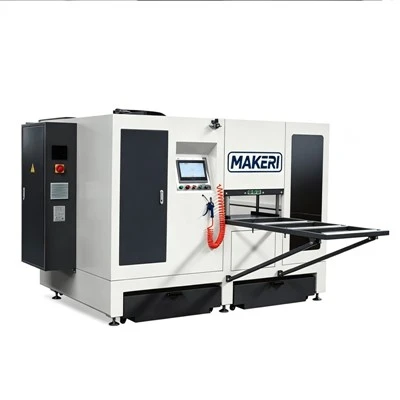
Hey there! I’m working for a supplier of Thermal Break Assembly Machines. Over the years, I’ve run into a bunch of common problems with these machines. And I know how frustrating it can be when things go wrong! That’s why I’m gonna share some tips on how to troubleshoot the typical issues you might face with thermal break assembly machines. Thermal Break Assembly Machines
Misalignment
One of the most common headaches is misalignment. You might notice that the thermal breaks aren’t fitting properly into the profiles. This can happen due to a few reasons.
First off, check the guides. The guides are like the roads that the parts travel on. If they’re dirty or damaged, the alignment will be off. I’ve seen this so many times – dust and debris can build up over time, making it hard for the components to move smoothly. So, give the guides a good clean with a soft brush. Get rid of any dirt or metal shavings that might be stuck there.
Another thing to look at is the clamps. The clamps are supposed to hold the profiles in place during the assembly. If they’re loose or not adjusted correctly, the profiles can shift, causing misalignment. Make sure the clamps are tightened properly and that they’re adjusted to the right width for the profiles you’re working with. You can use a feeler gauge to check the gap between the clamp and the profile. It should be just right – not too tight and not too loose.
Sometimes, the alignment issue can be caused by the machine’s base. If the machine isn’t sitting level on the floor, it can throw everything off. Use a spirit level to check if the machine is level. If it’s not, you can adjust the feet of the machine to make it level. This might seem like a small thing, but it can make a big difference in the alignment of the thermal breaks.
Jamming
Jamming is another pain in the neck. It can happen when the thermal breaks get stuck in the feeding system.
The first step is to check the feeding mechanism. Look for any blockages in the tubes or channels that the thermal breaks travel through. Sometimes, a single thermal break can get stuck at a bend or a junction, causing a backup. You can try using compressed air to blow out any blockages. Just be careful not to blow the debris into other parts of the machine.
The feeding rollers can also be a culprit. If they’re worn out or dirty, they might not be able to grip the thermal breaks properly, causing them to jam. You can clean the rollers with a mild detergent and a soft cloth. If the rollers are too worn, you’ll need to replace them. It’s a good idea to keep some spare rollers on hand so you can make the replacement quickly and get the machine up and running again.
The lubrication of the feeding system is also important. If there’s not enough lubrication, the thermal breaks can rub against the walls of the feeding channels, causing friction and jamming. Make sure to use the right type of lubricant recommended by the machine manufacturer. Apply the lubricant at the recommended intervals to keep the feeding system running smoothly.
Poor Glue Application
When it comes to gluing the thermal breaks to the profiles, you might encounter problems with poor glue application. This can result in weak bonds, which is a big no – no.
The first thing to check is the glue nozzle. If it’s clogged, the glue won’t come out evenly. You can clean the nozzle with the appropriate solvent recommended by the glue manufacturer. Use a small brush or a pin to gently remove any dried glue from the nozzle tip. Make sure the nozzle is completely dry before you start using it again.
The glue pump is another crucial component. If the pump isn’t working properly, the glue might not be delivered at the right pressure. Check the pump for any leaks or blockages. You can test the pump by running it without glue and checking if it’s running smoothly. If there are any issues, you might need to replace some of the pump parts.
The temperature of the glue also matters. Some glues need to be at a specific temperature to work effectively. Check the glue manufacturer’s instructions for the recommended temperature range. If the glue is too cold, it might be too thick to apply evenly. You can use a glue heater to maintain the right temperature.
Electrical Problems
Electrical issues can really put a halt to your production. You might notice that the machine suddenly shuts down or that some of the functions aren’t working.
The first thing to do is to check the power supply. Make sure the machine is properly plugged in and that the circuit breaker hasn’t tripped. Sometimes, a simple power surge can cause the breaker to trip. If that’s the case, just reset the breaker and see if the machine starts up again.
The control panel is another area to look at. If there are any error messages on the control panel, write them down. These messages can give you a clue about what’s going wrong. Check the wiring connections in the control panel. Loose or damaged wires can cause all sorts of electrical problems. You can use a multimeter to test the continuity of the wires. If you find a damaged wire, you’ll need to replace it.
The sensors in the machine are also important. They’re responsible for detecting the position of the parts and controlling the machine’s functions. If a sensor is malfunctioning, the machine might not operate correctly. Check the sensors for any signs of damage or dirt. You can clean the sensors with a soft cloth and test them using the machine’s diagnostic mode.
Noise and Vibration
Excessive noise and vibration can be a sign that something’s not right with the machine.
The first place to check is the bearings. Bearings are like the joints of the machine, and if they’re worn out, they can cause a lot of noise and vibration. You can listen carefully to the sound of the machine to see if the noise is coming from a particular bearing. If you suspect a bearing is bad, you’ll need to replace it. It’s important to use high – quality bearings to ensure the long – term performance of the machine.
The belts on the machine can also cause problems. If a belt is loose or worn, it can slip, causing noise and vibration. Check the tension of the belts and adjust them if necessary. You can use a belt tension gauge to make sure the belts are at the right tension. If the belts are too worn, replace them with new ones.
The motor can also be a source of noise and vibration. Check the motor mounts to make sure they’re secure. If the motor is vibrating too much, it could be a sign of a problem with the motor itself, such as an unbalanced rotor. In this case, you might need to call in a professional to repair or replace the motor.
Conclusion

Well, there you have it! These are some of the most common problems you might face with thermal break assembly machines and how to troubleshoot them. Remember, regular maintenance is key to preventing these issues from happening in the first place. Keep your machine clean, check the components regularly, and follow the manufacturer’s instructions.
Thermal Break Rolling Crimping Machine If you’re having trouble with your thermal break assembly machine and can’t figure out the problem, or if you’re thinking about purchasing a new machine, don’t hesitate to reach out. We’re here to help you keep your production running smoothly. Whether you need advice on troubleshooting, parts replacement, or want to learn more about our machines, we’re just a message away. Let’s have a chat and see how we can work together to meet your needs.
References
- Manufacturer’s manuals for Thermal Break Assembly Machines
- Industry – specific technical guides on machine maintenance and troubleshooting
Jinan Makerl Machinery Co., Ltd.
Jinan Makerl Machinery Co., Ltd. is one of the most professional thermal break assembly machines manufacturers and suppliers in China, featured by quality products and good price. Please rest assured to buy durable thermal break assembly machines made in China here from our factory.
Address: Qihe Dayu Industrial Park, Dezhou City
E-mail: info@makerlcnc.com
WebSite: https://www.makerlcnc.com/
